


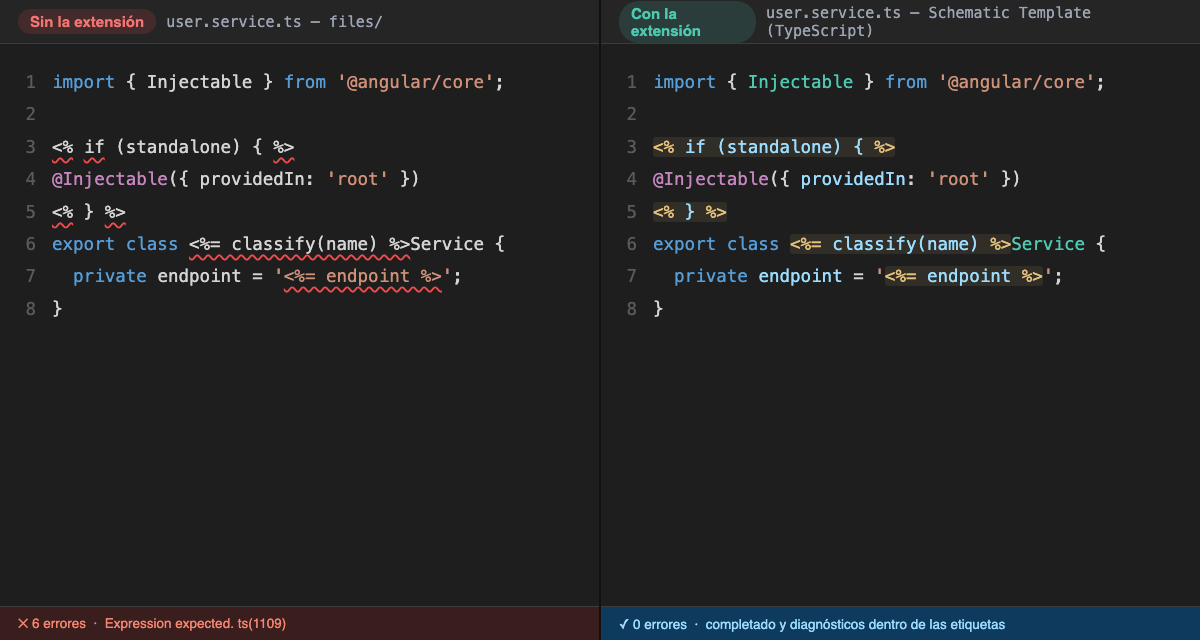
Opening an Angular schematic template in VS Code means seeing the file covered in red. The template is TypeScript, or HTML, or SCSS, but it carries embedded <%= %> tags, and the editor opens it as ordinary code: the highlighting breaks at the first tag and the TypeScript service reports errors that do not exist.
I have lived with this for many years. In one of the longest work experiences of my life, application code was generated automatically with Angular schematics, and every time I touched a template I worked blind, with no reliable highlighting, no completion and a Problems panel full of noise. Building this extension was always on my mind, but I never had the means or the time. This week I finally published it, and I am leaving it public for anyone who wants it: Angular Schematic Templates. My small contribution to make life easier for anyone who writes schematics.
What it does
The extension recognises templates by their context: a file counts as a template when it lives under a schematic’s files folder, either because a collection.json points there or because the folder has its own index.ts. Each template moves to its own language, Schematic Template (TypeScript) and so on for HTML, SCSS, CSS and JSON. With that, the built-in VS Code services stop complaining, and the highlighting understands both the host code and what sits inside the tags.
It also formats with the project’s own Prettier and config: it hides the tags, formats the code and puts them back untouched. If a tag would be lost or moved, the file stays as it was and the status bar explains why. There are snippets for the usual tags, and typing <% closes the tag for you.
Completion inside the tags
This is the part I like most. A language server reads the code inside the tags as TypeScript, with the type of the data the template receives. That gives completion, hover, go to definition and real errors, such as a property the data does not have.
You do not have to declare the type. The extension looks for the url('./files') call whose folder holds the template and, from there, for the call that passes it the data, template(vars) or applyTemplates(vars). When it cannot deduce the type, the first line of the template says why, and a quick fix lets you pick a type from a list and writes a header like this one:
<%# @context ../types/page-context#PageContext %>The template engine drops it as a comment, so it never reaches the generated code.
What it does not do yet
Highlighting inside the tags covers a flat subset of JavaScript, formatting does not touch JSON templates, and a template excluded from every tsconfig.json cannot resolve path aliases such as @app/.... The README has the full list of limitations. It is long, and I would rather have it written down than let each person discover their own.
Where to find it
The extension is on the VS Code Marketplace, with the code on GitHub under the MIT licence, in English and in Spanish. If you write schematics and something does not work the way you expect, an issue on the repository is the best way to tell me.